Showing posts with label Google. Show all posts

Google+ vs Facebook (Privacy)


Of all the comparisons between the two, how the privacy differences between Google+ and Facebook stack up might end up being the most important.
If there’s anything Google+ can learn from Facebook’s experience, it’s that people are going to pay attention to its privacy policy. The Internet veteran has had its own user data battles to fight (particular overseas relating to its street view cam cars), but nothing quite gets consumers in an uproar like a social network’s privacy settings. While Google+ is still in its early days and things are likely subject to change, here’s an introductory look at how it sizes up against Facebook when it comes to guarding your information.

Readability

Digesting a website’s terms of service is one of the most mind-numbing, time-consuming activities imaginable – which is why most users don’t do it. Of course the same people who fail to go over the legalese are usually the ones most offended, but that doesn’t entirely mean the blame falls to them. When this portion of a site sounds like an instruction manual and falls above the eighth grade reading level, you’re asking for outrage. That might sound as if we’re advocating for dumbing things down, but sometimes and especially when it comes to user information that such a mass amount of the population uses, you should pander to the lowest common denominator.
This year Facebook tried to do just that by cutting down on the sophistication of how its privacy policy reads. Its new “controlling how you share” section simply and relatively briefly explains the basics of information sharing on the site. But that’s hardly where it ends. The amount of “learn more” links is overwhelming, and when you access the site’s actual privacy policy, there is a mountain of information. Also, we can understand how so many different URLs that pertain to Facebook privacy could be confusing, especially for younger users, of which there are many. The idea of including the new, simpler guide is full of good intentions, but it could also lead to confusion and may keep people away from perusing the entire privacy policy, which is always a wise choice to make.
Google+’s infancy actually helps it here. As far as readability goes, seeing as there aren’t any advertisers or applications for the site (yet), it doesn’t have quite as much to explain when it comes to sharing your information. And instead of a variety of places dissecting its policy, you have two main locations: The designated Google+ privacy page, and the official Google privacy policy. But if you want details, you can check out the +1 button, Picasa, and Google’s mobile privacy policies. And of course if you start getting into what Google+ may be broadcasting from your other Google accounts, you could potentially have a lot to wade through.
Winner: Draw – Google+ may have less to initially muddle through by itself, but diving into the Google privacy dashboard can lead to hours of staring at your screen. Google+ wins for its attempt at approachability, Facebook for laying all the cards on the table, even though all those cards might be confusing.

Customization

see howBoth Facebook and Google+ provide a way for you to see how other users view your profile and customize who sees what. The difference between the two really comes in with when and how they do this. Google+’s priority while you’re creating your profile revolves around showing you what you share and goes for opt-in versus opt-out. Circles are a major part of managing this and are one of the things you’re sent to again and again (i.e., every time you add a new person, you are prompted to determine in what category they belong; every time you post something you indicate who all will see it).
Facebook has a similar customization tool, but you are never sent to it. When you decide to limit access to something on your profile, you go there on your own – Facebook will never prompt you to visit your privacy settings. Once you’re there, of course, the experience is generally intuitive. But with so many people skimming privacy policies and only reacting after the fact, we think Google’s agenda by trying to bring who sees what to the surface is the better approach.
Winner: Google+

Tags

approve tagsFacebook tags are the one of the best and worst elements of the site. You can choose to make photos you’re tagged in visible to only some people, but the effort involved in this means most people would rather choose one of the prescribed settings, like “everyone” or “friends only.”
Google+ has the option to choose people who can automatically tag you and whether they can attach the location. You will need to change this, however, as the default lets people do it automatically, but including the option is a big bonus and something Facebook users have been asking for. Unfortunately, we’re not in love with Google+’s wording, which doesn’t precisely indicate you are asking for authentication rights for tagged photos. Considering the fact the tagged photos can be one of the most damning things out there, it’s a big step in the right direction that Google+ has this feature at all, and we advise using it.
Winner: Google+

Photos

We recently wrote about how much we love Google+’s take on photo albums. While that’s still true, its policy when it comes to your images deserves mention. Photofocus points out that part of its terms more or less say that when you share photos, “you give Google a perpetual, irrevocable, worldwide, royalty-free, and non-exclusive license to reproduce, adapt, modify, translate, publish, publicly display and distribute” them. Of course Google’s TOS also say “you retain copyright and any other rights you already hold in Content which you submit, post, or display on or though, the Services.” But if you’re a professional of any sort, you’re right to be a little wary when it comes to throwing your images up on Google+.
Facebook has the same sort of wording regarding intellectual property rights, but points out that this depends on your privacy and application settings. Meaning set photo sharing to “everyone,” and you’re giving up a lot of content. If you have a specific album you don’t want at the hands of anybody out there, you should make sure to clarify that in your settings. You can designate how people see your Google+ albums but it doesn’t say in Google+’s terms that Google itself will adhere to this, which Facebook specifically points out it is also subject to your privacy settings for photos.
Winner: Facebook

Circle vs. Lists

When you share something via Facebook, you’re likely sharing it with a lot of people. Even if you use the customization settings to the hilt, a post is rarely sent out to a handful of people. Part of this is because Facebook’s been around for awhile and users have accrued hefty Friends lists. Part of it is because customizing those types of features came later in the process. Google+ was able to learn from this and sharing anything on its network requires you to dictate who will see it then and there.
Facebook Lists helps you create specific groups, and then you can choose what your friends do and don’t see. The problem is that you aren’t reminded who you’re sharing something with, you need to think about it yourself. And when you do want to customize who sees a post, the lock icon doesn’t bring up the lists you’ve so carefully created automatically. Creating Circles is also much easier and its visual appeal definitely outdoes Facebook’s text-heavy interface.
circles vs lists
Winner: Google+
Source: Digitaltrends

Harry Potter partners with Google, snubs Apple and PayPal


Google has joined forces with the most famous wizard in the world, Harry Potter, which could mean a big boost for two of its services while also resulting in a huge missed opportunity for Apple and PayPal. The partnership with the new Pottermore website by Harry Potter author JK Rowling will make the e-book version of the seven Harry Potter books available on Google's eBooks reader. The deal also makes Google's payment service Google Checkout the official third-party form of payment for Pottermore. By partnering with Google eBooks, Rowling has found a way to put her seven highly-in-demand books on smartphones, tablets, e-readers and computers without having to split the sales with companies such as Apple or Amazon, who typically keep about 30% of sales. Rowling's distribution method gives publisher's more leverage when it comes to selling e-books, said Craig Vodnik, chief blogger for BuildingKeystones.com, a blog about digital product e-commerce.


"It could be a really, really big deal if this works out based off the titles she's written and she's just so well-known," he said. "From the publisher's perspective it's a big deal because it could give them some control over how they distribute their products." Vodnik said Google landing Rowling is similar to when Apple finally got the Beatles on their iTunes catalog. In what must have been the tradeoff in the deal, Google's payment service Google Checkout appears to be the only way besides debit or credit cards to purchases the books from Pottermore. The inclusion of Google Checkout is a huge snub for PayPal, the original and most used third-party payment service online.

Instead, Google Checkout will be exposed to millions of Harry Potter fans looking to buy digital versions of the wizard stories. In the last few months, Google has been strengthening its push into the e-commerce and mobile payment fields, announcing recently it had begun testing a service called Google Wallet, which allows consumers to pay using their Android phones using a technology called NFC. The Harry Potter books could become the most purchased e-books upon their release if the franchise's performance at the box office and at book stores are any indication. The final Harry Potter film had the best opening of all time, scoring $168.6 million in the U.S. and Canada in three days. Four years ago, the last Harry Potter book had a similar release, selling 8.3 million copies in its first day, according to Guinness World Records.

Official Google+ app for iOS Available


With the technology world officially in love with Google+, we figure it wouldn’t be long until Google released a dedicated app for the social network for iOS. That moment has arrived. Available now on the App Store, the Google+ app promises users all of the huddling, streaming, and sharing that they’ve grown to love with the web version of the service. Facebook, be afraid.
The catch? The app only works on the iPhone 3G, 3GS and 4. Sorry iPad, iPod Touch users.
Source: zdnet via App Store

Social Networking Website by 'Anonymous' Hacktivists against Google+

AnonPlus: Social Networking Website announced by 'Anonymous' Hacktivists against Google+

The infamous hacktivist group Anonymous has announced its own social networking website, AnonPlus, after being banned from Google+ social network.

Google+ has recently been enforcing a policy of shutting down profiles which contain fake names or those that represent organisations rather than individuals, so it's not exactly surprising to see Anonymous-related profiles being zapped.
 

Google in a recent move, not obly kicked Anonymous out of its newly launched social network, Google Plus, but also blocked their primary access to all of its services including Gmail, Google Calendar, Picasa, YouTube, etc. Because all Google products and services are intergrated together and drive through its primary Gmail account.

Anonymous announced the suspension on a Tumblr blog, but it is not clear exactly why their Google account is suspended. A screen shot of the message from Google posted on their Google+ account Your Anon Newssays:

AnonPlus: Social Networking Website announced by 'Anonymous' Hacktivists against Google+
On AnonPlus.com, Anonymous has listed a team of 17 Java developers, who it says will develop AnonPlus, alongwith its manifesto Social Networking Anonymously, saying:

This lil info dump of a site is here simply to dispence info, soon the actual site will go up and you can begin to interact with it," Anonymous said on the site. "This project is not overnight and will take many of those out there who simply want a better internet. We will not be stopped by those looking to troll or those willing to stop the spreading of the truth. One thing i would like to point out that this project is for ALL people not just anonymous, this idea is a presstorm idea and only takes the name anon because of the Anonymity of the social network.
However, experts doubt that Anonymous have enough capacity, resources and infrastructure to take this challenge to success. Graham Cluley, a senior technology consultant at Sophos, wrote on his Naked Securitybog:
Yes, Google - with all the resources it has available - appears to have done a good job with Google+, but surely a loosely-knit amateur collective like Anonymous, which rejects organisational constructs, will have a much steeper challenge.

It will be interesting to see if AnonPlus becomes popular if/when it launches with the very people it is intended to help - those who are being prevented by oppressive regimes from sharing information freely and safely with the rest of the world.

Google Plus: Basic Tips for Beginners


Google+ is on its way to charm people and many of the Facebook users are already making their minds to take a shift, so it is just matter of time, but again these are somehow pre-mature thoughts, so we will have to wait and see the impact.
Frankly speaking, we had to spend sizable amount of time to get familiar with Google+, we thought of saving you from the effort. So let’s start with Google+ and here you will get some basic useful tips if you are just joining Google+ or are still wondering what to do here?

Getting Started

There has been much hype about how and from where to get Google+ invitations. People started writing tutorials on how to invite someone on Google+, but Google has resolved the issue now and you do not need to end up pasting your email address here and there to ask for an invite.
Registrations on Google+ are now open and you can sign up without any invite. Simply visithttp://google.com/+/ and register yourself.

Welcome to Google+

If you have ever used any of Google’s services (Gmail, Google Profile, Blogger, etc.), then there are chances that Google+will detect more than 50 percent of your bio – to fill your profile. Don’t worry, your privacy settings will not be disturbed. For instance, you can link your Picasa account with Google+ while maintaining the same privacy settings as they were with your Picasa account.
So it’s time now to upload your profile picture and write something about you.

Build Your Circles

Next thing that you should do is, build up your circles and invite others. But to know what really circles are, read below:
  • Circles are different set of groups, or lists with different permissions. You can add your contacts in these circles to make sure that you don’t share your information with those who shouldn’t see them.
  • You will get updates from contacts that you have added in your circle. Just like twitter, you start getting updates from those whom you follow
  • Contacts in your circle will not get your updates, though they will be invited – but they can deny any incoming requests.
By default Google offers following circles to you, of course you can create more with ease
  • Friends
  • Family
  • Acquaintances
  • Following
You can simply mouse over them to read what kind of circle it is and sharing settings.
circles thumb Google Plus: Basic Tips for Beginners

Adding Contacts to Circles:

  • Click circle button (right on top middle – or where the red arrow is in above image)
  • Go to "Find and Invite" tab
  • Here you will be suggested with contacts that you may want to add in your circles, drag and drop them in below circles… simple as that
  • Note: Suggestions will be those contacts that you recently interacted with on Gmail
  • Want to add someone who is not in suggestions: There’s a button “Add a new Person”, click on it – type email address and you are done.
So you are almost done with basic settings and this is the time to go out and say Here I am!

Posts and Stream

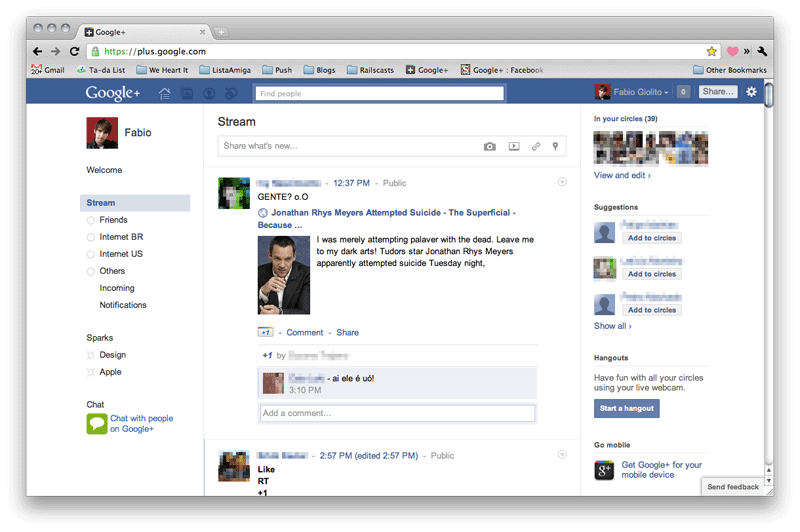
You must be familiar with wall posts on Facebook, here Google calls it stream. And for me, the most loveable feature of Google+ is to get stream from specific circle.
Streams thumb Google Plus: Basic Tips for Beginners
  • Select stream from any of your circle and updates from only those will be shown from the circle
  • You can Share a post from your stream, comment on it +1 it (kind of liking a post)
You can post an update, using the box given on top of stream – exactly like facebook has;
  • Post any thing you feel like, you can add videos, pictures, links and so on
  • You can edit posts later on, delete them, mute them and so on
  • You can select circles or contacts that you want your post to be shared with.
  • You can disable resharing and/or commenting
stream update thumb Google Plus: Basic Tips for Beginners

Hangouts

Hangouts is the coolest feature of Google Plus, it will let you start a video conversation with as many friends of yours as you like.
Simply click the “Hangout” button available on right sidebar or visit this link:plus.google.com/hangouts
You’ll be taken to a "green room" where you can select circles or individuals to add in your room (video chat).

Sparks = Interests and Likes

Visit the Sparks menu from left sidebar and you will find featured interests. Don’t worry, you are not bound to like them. Search your interests and while adding them, Google+ will give you content suggestions that you can share on your wall, stream in fact.
Once again Google+ allows you here to set which circles you want to share with and it works the same way as described for the post.

Turning Off Email Alerts

By default, Google+ will email you for every post, comment, +1 or anything that happens and is related to you.
This may irritate you – so simply visit Google+ settings from the Options menu which you can find at the extreme right of black bar – codenamed the “Sandbar”, you must have noticed it appearing from few days.
So just un-check the relevant boxes and you are done.
email settings thumb Google Plus: Basic Tips for Beginners

Missing Facebook?

If you are missing Facebook here on Google+ and all that blue interface still mesmerizes you, make your Google+ look like Facebook.
It is simple and easy. Visit http://userstyles.org/styles/50051/google-facebook and follow the two step tutorial.
First install Stylish extension by selecting your browser from the list and then install the script. Here you are with your Google+ converted into Facebook!
google plus like facebook thumb Google Plus: Basic Tips for Beginners
This was just a sneak peak of Google+ for beginners.
Google has planned to add more features like Games, Events etc. As project is considered to be one of the prime goals of Google to compete it’s rival Facebook so we can expect a lot from Google here.
Fell free to share any tip in comments.
Souce: ProPakistani.pk

Google brings Search by Image and Voice Search to desktops


While Google is still by far the most dominant search engine on the Web, it can't afford to rest on its laurels with Microsoft constantly adding new features to its Bing search engine. At Google's 'Inside Search' event, the company has announced several new features designed to ensure it stays on top of the lucrative search engine game. Users will now be able to search using images, enter search terms by voice and have the top search results pre-rendered so they appear instantly.
Google Goggles has been letting users conduct searches based on pictures taken on mobile devices since 2009 and now Search by Image brings the same functionality to the desktop. Users can drag and drop an image from the Web or stored locally on their computer over the Google search box and Google will try and identify it and bring up relevant results. Users can also Search by Image by copying and pasting an image URL or uploading an image by clicking on the camera icon in the search box. Google is also releasing extensions for Chrome and Firefox browsers that will let users search an image on the web by right-clicking on it.
The company says it is rolling out the feature globally in 40 languages now, but it doesn't look to have been activated in my neck of the woods yet so I wasn't able to put it the test by attempting to identify the location of my holiday snaps. If you point your browser to images.google.com and see a camera icon in the search box, however, you should be good to go.
Another feature making its way from mobile devices to the desktop is Voice Search. The feature is limited to Chrome 11 or higher users who will see a microphone icon in the search box. Users can click on the icon and speak their search - provided their computer has a built-in or attached microphone.
Also revealed at 'Inside Search' is Instant Pages, which is basically an evolutionary step of its Instant Search feature introduced last year that provides search results as you type. To speed up things even further, Instant Pages will pre-render the top search result in the background so it will appear instantly when clicked. Instant Pages will be included in the next beta release of Chrome but can be tried now with the developer version.
Check out the videos below for examples of the new Google features.
Search by Image 
Voice Search 


Instant Pages 


Everything You Need to Know About Near Field Communication

Smartphone makers, wireless carriers, and credit card companies have all proclaimed their love for near field communication over the last week. And we share their enthusiasm: NFC has a lot of exciting potential. Soon enough, we'll be able to make payments, unlock our houses, stop worrying about our cumbersome Wi-Fi passwords, and hop on the subway without a transit pass, all from our phones. Here's how.


What Is NFC?
NFC is a short-range, low-power communications protocol between two devices. One device, the initiator, uses magnetic induction to create a radio-wave field that the target can detect and access, allowing small amounts of data to be transferred wirelessly over a relatively short distance (in NFC's case, the distance must be less than 4 inches). If that sounds a lot like RFID, the tech used by, for example, wireless toll-collection devices like EZ-Pass and FasTrak, it's probably because NFC is pretty much an evolved form of RFID. The difference is that RFID is a one-way street: Your EZ-Pass transmitter beams your $4.25 toll to the tollbooth's receiver, and that's the extent of the transaction. But, crucially, NFC is two-way, allowing your NFC-enabled gadget to both send and receive information.
Compared to other wireless protocols like Wi-Fi or Bluetooth, NFC is exceedingly slow, with a maximum data transfer speed of 0.424 Mbps, less than a quarter that of Bluetooth. But NFC has several key advantages over Bluetooth: It consumes a mere 15 mA of power (practically nothing for today's jumbo smartphone batteries), it has the possibility for greater security (more on that in a bit), and it forgoes the involved "pairing" process of Bluetooth entirely. Bluetooth needs to be configured; NFC is completely effort-free, requiring nothing more than a tap.

Google Nexus S: Google's Nexus S, made by Samsung, is the first NFC-compatible smartphone in the U.S.  Google


What Can You Do With NFC?

The three main concepts that the NFC Forum, the main association of companies promoting NFC, is pushing are "sharing, pairing, and transaction."
Transaction is the most obvious of the three, and the one we'll probably start seeing first. A smartphone with an NFC chip could very easily be configured to work as a credit or debit card. Just tap your phone against an NFC-enabled payment terminal, and bam, money spent, consumerism upheld, everyone's happy. But that's really only the start of what NFC can do in terms of transaction.
The other contents in your wallet aren't safe from NFC takeover, either, which is sure to enrage the formerly bulletproof wallet industry. NFC could work well for public transit passes, library cards, hotel room keycards, and office building passcards. Even government-issued IDs like driver's licenses and passports can be replaced or augmented with NFC, though the security concerns there could push such applications further into the future. But the point is, it's all possible, and relatively easy. Even keys could someday become a relic of the past, replaced by the tap of a phone to a lock.
"Sharing" is a little bit trickier, due to the limitations of the tech. Mostly, it'll be used much like QR codes--(the square barcode-like tags scannable by your cellphone camera--are used now, just without the need to open an app and take a picture. An active NFC-enabled device like a smartphone can interact either with another active NFC device or with a passive tag. That tag is basically just a little chip that's embedded with some kind of data to transfer--maybe it's in a printed ad, and provides a URL for more information. Those passive tags don't require power, either, instead relying on the RF field created by your phone, so you can just tap your phone to the tag and have a little bit of data--often a URL--beamed to your phone.
Debbie Arnold of the NFC Forum says "the concept of tag-reading is really exciting to me," as those passive, unpowered tags are very cheap and could be embedded in all kinds of places. Tap your phone against a tag on an appliance to get its warranty info, or on a pack of cigarettes to get some horrifying government-sponsored images of smokers' lungs. You know, for fun.
With its sub-0.5-Mbps speeds, you won't be beaming high-def video with your smartphone, so sharing of files will be limited to smaller items like photos, documents, and URLs (which, in our cloud-connected environment, is often all you need). But say you do want to send a fairly large file like a video. NFC can come in handy there too--as a bridge to a more intensive wireless protocol.
Which is where the "pairing" concept comes into play. Tap your phone to another phone to instantly configure a Bluetooth or Wi-Fi connection, without the need for passwords. Or tap your phone against your new router, and never again have to worry about that tiny scrap of paper with your deliberately complex Wi-Fi password that you could've sworn your roommate taped to the freezer. Or tap one phone to another to instantly exchange contact information, even when there's no available 3G connection.

Why Are Gadget-Makers, Bankers, Merchants, and Wireless Carriers So Gung-Ho About It?

NFC has some pretty amazing possibilities, but the reason every company from Google to Visa to McDonald's to T-Mobile is singing its praises has nothing to do with your ability to remember your router's password. In their eyes, NFC is always bracketed by dollar signs, with thoughts of direct advertising and real-time customer data causing their brains' mouths to mind-water (it's a serious condition). Pay for a purchase with your NFC-enabled phone, get a coupon. Tap your phone to an NFC-enabled movie poster, get a special offer for a 1PM Tuesday showing of Gnomeo and Juliet: The Squeakquel (this will be in the near future, obviously). Use NFC's mobile payment capabilities, and you're likely to get coupons, promos, samples, or other various digital perks beamed back to you in response.
But that doesn't explain why the business types are quivering in their business suits about NFC. The answer: It's all about advertising.
When Google's soon-to-be-ex-CEO Eric Schmidt recently took the stage at Mobile World Congress, he was barely able to contain his excitement. Google, let us recall, is in the business of ads and customer data. When you make an NFC purchase, your phone isn't just transmitting your bank numbers for payment. It can also transmit your buying habits and demographic information. That sounds terrifying, but for the most part that kind of information is already out there and being used every time you buy an app, or anything from Amazon, or search for a product on Google. NFC just has the potential to make that data available instantly and in real time, which is exceedingly valuable to marketers and retailers and other people who care that you prefer Five Guys to Shake Shack. And instead of coupons, you might get beamed advertising instead--intensely targeted ads tailored to your latest purchase.
Of course, it's unlikely that your personal data would be given to merchants without your knowledge -- at least by Google, which has a history of providing opt-out options for advertising like that. But if would certainly be possible.

Why Now?

At MWC, Schmidt said that "NFC has been around for a long time, but everything has just started to come together," which is mostly true. Magnetic induction for data transfer has been around for quite a few years, and mobile payments via magnetic induction have even become the de facto standard in Japan. The Mobile FeliCa (Felicity Card) has been in wide use in Japan, packaged into handsets from DoCoMo and Sony, but according to Debbie Arnold, spokesperson from the NFC Forum, systems like Mobile FeliCa "were more of a precursor to NFC." Mobile FeliCa is a one-way transfer card, a simpler form of RFID, that requires no power. "Nobody wanted to put up a product until NFC was ready," says Arnold, and it appears that it's ready now.
In late 2010, the NFC Forum finalized its first wave of technical specifications, as well as announcing its certification process for devices. Debbie Arnold notes that the program "gives manufacturers a means of confirming that their devices comply with NFC Forum specifications, and helps to ensure interoperability." It was only last year that tests and pilots were undertaken, which in turn led the banks, mobile carriers, and hardware manufacturers to jump on board and start really putting the web of NFC together.

What About Infrastructure?

It's generally assumed that the introduction of NFC into smartphones will require a massive infrastructure overhaul, but that may not be the case. NFC, as an evolved form of RFID, is actually compatible with existing RFID terminals, which are distributed by companies like Visa and MasterCard and are present in businesses from the international (McDonald's) to the local (my childhood sandwich purveyor, Wawa). For your bog-standard wireless payment, no fancy new hardware will be necessary.
NFC's N-Mark:  NFC Forum
Of course, those businesses that want to take advantage of NFC's more ad-friendly two-way abilities will need to install new NFC-powered point-of-sale devices. If McDonald's wants to know how many chicken nuggets you typically eat at a meal, they'll have to install a two-way NFC terminal. But the companies that really want that kind of data are typically not your mom-and-pop corner store, and are more likely to pony up for an NFC upgrade. The mom-and-pop store can still step up to a cheaper RFID reader, which works in the same system. You'll be able to find NFC-enabled devices by looking for the "N-Mark," pictured left, which alerts you that NFC-ing can be commenced.
In terms of phone hardware, you can expect to see NFC in the next generation of smartphones--basically, the ones after the ones that are about to hit the market. Google built some pretty elaborate NFC capabilities into the latest release of Android (version 2.3 Gingerbread), and the NFC Forum counts such high-profile companies as Sony, Nokia, LG, Motorola, Qualcomm, and RIM (BlackBerry) among their principal members. In the last week alone, we've gotten major commitments from Google, RIM, and Visa, with more surely to come. At the moment, only Google's Nexus S has an NFC chip (and that's fairly useless at the moment), but future Android, BlackBerry, and probably iOS devices will boast NFC abilities: rumors of an NFC-capable iPhone 5 have recently begun to surface.
According to a very recent leak, BlackBerry is partnering with Bank of America to offer NFC retrofitting as soon as this spring, and their solution is pretty clever: Instead of waiting for a new phone, BoA will simply provide an NFC-enabled replacement battery door for a few BlackBerry models, accompanied by a software update that will allow mobile purchases. That won't work for the iPhone and a few Android devices which lack replaceable battery doors (or, um, replaceable batteries), but an NFC-enabled phone case could accomplish the same feat.

Is This, Well, Safe?

Ah, security. NFC is inherently worrisome in that it promotes the transmission of very sensitive data through the air, like magic, and that data could theoretically be snatched. The NFC protocol itself has surprisingly few actual safeguards against data snatching--and the protections the NFC Forum does highlight are simply logical extensions of the physical nature of the protocol. For example, that 4-inch transmission zone would theoretically make it a challenge to steal data wholesale without a crafty plan. There's also the ability to simply turn NFC off when you're not using it, which could stem some piracy, if you remember to do it each time. But that's not really enough; it's like declaring a wallet generally safe just because it's difficult for a pickpocket to get close enough to snatch it undetected.
The NFC standard leaves any kind of advanced protection, like encryption or password protection, up to whoever uses it. You'll have to trust your bank to encrypt your bank info, you'll have to trust Google, Apple, or RIM to encrypt your account info, you'll have to trust your digital locksmith to encrypt your new space-age virtual house key, and so forth. It's relatively easy for any of these companies to embed encryption or a password, but they still have to do it. According to Debbie Arnold of the NFC Forum, "Applications may also provide their own security appropriate to the application," like encryption and password protection, and that "these security requirements can be tailored to the particular application."
That being said, point-of-sale security, using the ISO 14443 protocol, is already a standard, being used by the major credit card companies with RFID tech, and NFC won't change that. More advanced security like encryption, newly available for NFC, is to avoid eavesdropping, which the NFC Forum says is up to the developers. The NFC Forum's third-party solution isn't entirely satisfying--we'd much rather see an encryption standard embedded in the tech from the start.
Destruction of the signal is actually much more likely than eavesdropping, provided there's adequate software encryption being used. An RFID jammer can also ruin an NFC chip's ability to communicate, and there's no real way to counter such an attack. Of course, there's no real reason to jam a signal other than immensely irritating prankery.
I spoke to the Federal Reserve to find out about NFC's inclusion in the Truth in Lending Act, a piece of legislation that protects customers from having to pay bills of more than $50 that result from a stolen or otherwise unauthorized card. Though NFC is not specifically mentioned in the legislation (understandably so, given its newness), the Fed representative I spoke to noted that there are a few clauses to which NFC could be applied without much of a stretch. "I don't see why it wouldn't be covered under the Electronic Funds Transfer regulation," the rep told me. "It's still going to be an electronic transfer, and other wireless tech like magnetic transfers are already covered." Those "magnetic transfers" are referring to the RFID chips inside certain credit cards, already in use--and since NFC is essentially an evolved (and still magnetic) version of RFID, it seems a no-brainer that NFC would also be covered.

Will It Succeed?

NFC has tons of potential, and with backing from banks, hardware makers, and retail shops, it'll likely be widespread before long. Whether it's embraced smoothly will depend in large part on the implementation--Android's NFC functionality, from the brief glances we've seen, look kind of obtuse and complex, and NFC needs to be super simple for the public to understand and use it. But if it's done right, the days of crammed wallets and forgotten passwords may be coming to a close.
Source: Popsci