Showing posts with label Apple. Show all posts

'iPhone 4S' and iPad 3 Coming in Late October?

Macotakara reports that it has received information indicating that Apple will be introducing the iPad 3 and "iPhone 4S" sometime early next month, with availability set for "late October". The source offered no information, however, on plans for the iPhone 5, although rumors have suggested that Apple will introduce both a revamped iPhone 5 and tweaked iPhone 4 next month.


According to sources, iPhone 4S which is based on iPhone 4(CDMA) and new iPad will be started produce since 1st week in September and will be shipped in late October.


The "iPhone 4S" name is an unofficial one that has been used in a variety of reports to refer to a new iPhone based largely on and appearing nearly identical to the current iPhone 4, but offering upgraded internal components. What has come to be known as the iPhone 5 is a more thorough redesign which has surfaced in case designs reportedly based on leaked design specs. 


There had been some confusion about whether Apple would be releasing an "iPhone 4S" or "iPhone 5" this year, with some suggesting that the confusion stemmed from Apple testing iPhone 5 components within iPhone 4 enclosures for secrecy. But others have claimed that Apple will indeed be introducing both the iPhone 5 and a tweaked iPhone 4 as rumors of a low-cost iPhone have continued to swirl.

 Apple has of course traditionally kept its older models around as entry-level options, as evidenced Apple's continued sale of an 8 GB iPhone 3GS model, but the volume of rumors suggest that Apple may be doing a bit more tweaking to its low-end offerings this time around. Such low-cost models are said to be key for penetrating the prepaid markets prevalent in a number of large countries around the world.


Macotakara has offered some accurate information in the past, and notably was the first source to pinpoint some of the features of the iPad 2 as case designs began leaking out. A number of potential dates for a media event introducing the iPhone 5 and perhaps the iPad 3 have been suggested, with early reports of a September timeframe being countered early last week with a report from All Things Digital claiming that the device won't be available until October. The latest rumor has, however, claimed a September 7th media event, although an iPhone 5 introduction at that time to be followed with a launch as far off as late October would be outside Apple's usual gap between introduction and availability.

Apple Becomes the World’s Most Valuable Company Crossing Exxon Mobile


The world’s leading smartphone manufacturer and vendor, Apple Inc., is now the world’s most valuable company surpassing Exxon Mobil Corporation.

Earlier today, Apple’s shares were trading at $367 which made it briefly past Exxon Mobil, with a total worth of more than $341 billion.


Two months ago, Apple was about $50 billion less in worth than the oil and gas corporation. But after reporting record sales (in the last few weeks) of two of the most popular gadgets i.e. iPad and iPhone, it has managed to take over the top position.

On the other hand, Exxon Mobil has seen a steeper decline as oil prices have fallen over the past few days. For how long Apple will be able to keep the top spot? We will have to wait and see where the market settles at the end of the week to find that out.

[via Mashable]

Apple Sued Over 'Fast Booting' Patent which Links To LG


Patently Apple reports that Apple has been hit with a new patent lawsuit targeting "fast booting" used in OS X, a method of utilizing boot configuration information from earlier booting processes to speed the system startup process.


The lawsuit specifically states that Apple's OS X violates "at least Claim 1" of the OSS patent. The claim in question reads as follows: 

"A method for fast booting a computer system, comprising the steps of: A. performing a power on self test (POST) of basic input output system (BIOS) when the system is powered on or reset is requested; B. checking whether a boot configuration information including a system booting state which was created while executing a previous normal booting process exists or not; C. storing the boot configuration information from execution of the POST operation before loading a graphic interface (GUI) program, based on the checking result; and D. loading the graphic user interface (GUI) program."


What is most interesting about the patent and associated lawsuit is that the patent application was initially filed back in 1999 and assigned to LG Electronics. LG is of course a competitor to Apple in the smartphone market, but also serves as a supplier to Apple, primarily through its LG Display arm.

It is unclear, however, whether LG still has any stake in the patent in question, as the assignment on the patent has changed hands multiple times dating back to 2004. LG initially passed the patent off to a company known as Microconnect LLC, but the patent was subsequently passed along to firms by the names of Protimus Technologies LLC and ANPA Inc while also being reissued once along the way. The patent lawsuit has been brought by a Florida-based company called Operating Systems Solutions LLC, which appears to be a previously-unknown entity that may have been created specifically for the purposes of the lawsuit.

Apple is of course no stranger to patent and other types of lawsuits, not only engaging in high-profile disputes with major competitors but also both taking on and being targeted by smaller firms. And while this latest lawsuit may simply be a case of a small patent holding firm seeking to capitalize on its holdings, the patent's historical ties to LG naturally lead to questions about whether yet another of Apple's major competitors is playing a role in the ever-increasing legal entanglements for Apple.

Apple iOS 4.3.5 Jailbreak: iPad, iPod Touch and iPhone 4.3.5 Jailbreak

Apple iOS 4.3.5 was released alongwith fixes for some previous Vulnerabilities in the new mobile operating system.


However, thanks to MuscluNerd, a iPhone Dev Team member, who confirmed on twitter that the new Apple iOS 4.3.5 Jailbreak is still a possibility on all devices like iPad, iPod Touch and iPhone (except the iPad 2) just by pointing the tool at the 4.3.4 IPSW:

Apple iOS 4.3.5 Jailbreak: iPad, iPod Touch and iPhone 4.3.5 Jailbreak

Warning: Those of you, who are relying on a carrier unlock must stay away from Redsn0w Jailbreak.

Since Apple patched comex’s exploit in Apple iOS 4.3.4, this will be a Tethered iOS 4.3.5 Jailbreak. It is still recommended to stick with iOS 4.3.3 for an Untethered Jailbreak.

How to Tethered iPad, iPod Touch and iPhone 4.3.5 Jailbreak

First of all select and downlaod the appropriate program applicable to your device from the given options:
Now please follow these step by step instructions given here under:
Step 1: Start Redsn0w Apple iOS 4.3.5 Jailbreak program, browse for the iOS 4.3.4 firmware file (NOT the 4.3.5) that you downloaded above and point it towards Redsn0w.

Step 2: Once Redsn0w is done with recognizing the firmware file, click Next. Then check the 'Install Cydia' box and leave other options as it is for now. Once done, click Next.

Step 3: Now just follow Redsn0w, it will ask you to shut down your device and plug it in to the computer. Once plugged with computer, follow the onscreen instructions and then click Next to continue.

Step 4: RedSn0w will now guide you on how to put your device in DFU mode. Follow the instructions carefully till your device get’s into DFU mode. Follow these simple steps to put your Device into DFU Mode:
  • First of all,Press and Hold the sleep button for 2 seconds.
  • While holding the sleepbutton,Press the Home button for 10 seconds.
  • Now release the sleep button but continue Holding the home button for about 15 seconds.
Step 5: One in DFU mode your iPhone will restart, Now, just wait while Redsn0w gets installed and jailbreaks your device. Once finished your iPhone, iPad or iPod touch will restart automatically.

Troubleshooting:
Any Windows users seeing 'Waiting for reboot' for too long (more than 20 seconds or so), please try 'shaking' the JB process by unplugging then replugging your USB cable (while letting redsn0w continue to run). Also, try using a USB port 'closer' to your computer (as opposed to on your monitor or behind another hub).


Apple iOS 4.3.5 Jailbreak on iPad, iPod Touch and iPhone 4/3Gs
Here is a video tutorial for Apple iOS 4.3.5 Jailbreak on iPad, iPod Touch 4/3Gs for iPhone 4.3.5 Jailbreak using RedSn0w 0.9.8b:

iPhone 5 and ‘simplified iPhone 4′ both due out this fall, report claims


After several reports pointing to a lower-end iPhone set to be released this fall, a new source is now suggesting that along with the iPhone 5 we’ll see a “simplified iPhone 4”, as reported by the Chinese language website Sohu.com.

According to the report, Apple has reached an agreement with China Telecom, China’s state-owned mobile carrier, to bring two devices to the country: the iPhone 5 and a lower-end iPhone, allegedly similar to the iPhone 4, around “the end of October”. As claimed by the source, and as speculated by us many times, the lower-end iPhone model will be cheaper and most likely targeted at developing and emerging markets, such as China:

a more economical version of iPhone to target a broader customer base in developing countries such as China, allowing for an expanded market opportunity.

Apple’s current solution to make the iPhone available to a greater number of customers is to simply sell the previous-generation device for a lower price. While the iPhone 4 has been available for a year, Apple keeps manufacturing the nearly two-year-old iPhone 3GS and selling it for $99 instead of its original price of $199, but now the supply of the iPhone 3GS is dwindling drastically. This approach has its obvious shortcomings, including the device’s aging hardware that developers and Apple itself will be forced to support as long as the device is sold.

The lower-end iPhone will reportedly be similar to the iPhone 4, which has been for sale for over a year, although we don’t yet know much about its hardware or software. According to previous reports on the matter, however, we would guess that this low-end smartphone will be an iPhone 4 with improved internals and perhaps slightly cheaper plastic casing, as opposed to the iPhone 4’s glass enclosure, in order to reduce manufacturing costs, and therefore the price.

This report also, once again, sparks up the debate over whether the next iPhone will be released in September or October, since the source points to an October release, at least in China. I believe, as we have speculated previously, that the US release will take place sometime in September with an international release in October, since the iPhone 5 has allegedly reached final testing stages. The iPhone 5 is expected to be announced by Apple at the company’s traditional music and iPod event in September and released a few weeks later.

(via BGR)

Explosion of Mobile Gaming


Geekaphone, an online resource for the mobile industry, has revealed stats about mobile gaming industry. They have been researching the mobile gaming industry and revealed figures for 2011.
A few key points that stand out are:
  • The mobile gaming industry is predicted to reach $54 Billion by 2015
  • 84% of tablet owners play games
  • 70 – 80% of all mobile downloads are games
  • Android is soon to overtake Apple in number of total available apps
  • In-game purchases should overtake pay-per-downloads by 2013
  • Angry Birds has been downloaded 140 million times
  • Developers made $87 million in ad revenue in 2010 and will grow 10 fold by 2015
Infographic Mobile Gaming Statistics Mobile Gaming Industry Statistics for 2011 [Inforgraphic]

iCloud and iWork Beta Launched For Developers


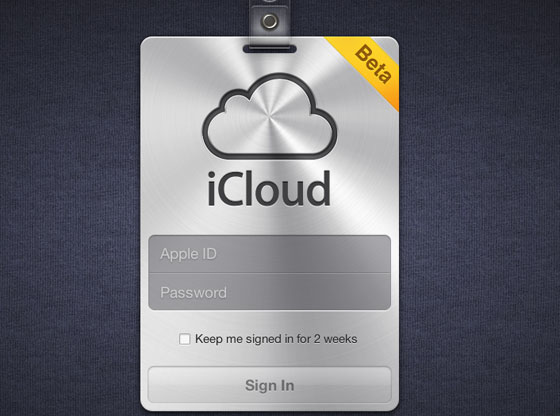
Apple seems to have opened up the iCloud Beta on iCloud.com. Notably, the login page is nearly identical to a leak from the days before the original iCloud announcement. We were doubtful of the screen at the time, but it appears to have been legitimate. 

There's some mixed reports about people being able to login. We have reports of both developers and non-developers having success and trouble logging in. 


iWork Beta with iCloud support was also seeded to developers: 

Apple Becomes World's Top Smartphone Vendor Passing Nokia and Holding Off Samsung

Just hours after research firm IDC released data showing Apple dramatically outpacing the overall mobile phone industry in year-over-year growth for the second quarter of 2011, Strategy Analytics has confirmed that Apple has indeed become the world's largest smartphone manufacturer. In that smaller but faster-growing submarket, Apple dethroned long-time leader Nokia and just barely held off a fast-rising Samsung to take the top spot.
Alex Spektor, Senior Analyst at Strategy Analytics, said, “Global smartphone shipments grew a healthy 76 percent annually to reach a record 110 million units in Q2 2011. We had previously reported on Apple becoming the largest smartphone vendor in terms of revenue and profits. Now, just four years after the release of the original iPhone, Apple has become the world’s largest smartphone vendor by volume with 18 percent market share. Apple’s growth remained strong as it expanded distribution worldwide, particularly in China and Asia.”
With both Apple and Nokia reporting their quarterly financial results last week, it was confirmed that Apple had passed Nokia, but some analysts had suggested that Samsung might surge past both companies on the strength of its Android-based handset sales. While Samsung did indeed achieve remarkable 520% year-over-year smartphone growth to move from 5.0% of the market to 17.5%, Apple's performance was strong enough to at least temporarily take the crown with 18.5% of the market. 

ABI Research has also released similar data showing Apple on top of the smartphone market with Samsung in a close second.
ABI Research Senior Analyst Michael Morgan comments: “Although Apple’s 142% YoY growth placed it as number one this quarter, Samsung’s 500% YoY growth shows that going forward, the top smartphone OEM position is Samsung’s to lose.”
ABI Research estimates that 47 million Android phones were sold during the quarter, giving the platform 46.4% of the smartphone market, more than double that of the iPhone.

Mastering Voice Recognition On Your iPhone, Android, or Desktop


Nobody talks on the phone anymore, but people are talking at their phones. On any platform, check your settings and helper guides to get an understanding of what your app or phone can actually do, as completely misunderstood responses from a speech app can be pretty infuriating. Android phones with Google's Voice Search installed, for example, can make a phone call, compose email, send a text message, get directions, and pull up musical artists-but can't launch applications from vocal commands. This isn't so much an issue on iPhones, but Androids and other phones can have pinhole-style microphones that can get gummed up or partially covered by awkward cases. Intermediate: Stop Slowing Down, But Think Before Speaking You need not talk like a robot to be understood by one, says Vlad Sejnoha, chief technical officer at Nuance, maker of the Dragon speech-to-text software for Windows, Macs, iPhones and iPads.


Dragon's software learns speech styles and tics over time, and you want to aim for a natural speaking flow. Digging around Android forums and elsewhere, I found a good number of tesimonies from speech-to-text enthusiasts who saw better results from simply speaking at a normal clip. Google representative Nadja Blagojevic offered much the same advice for the search giant's voice product in both Android and its Chrome browser: Speak naturally and clearly, but don't strain to enunciate too much or speak slowly. Advanced Dictation: Punctuation and Personalization Another embarrassing thing you can stop doing is holding your phone or desktop microphone directly in front of your mouth. In your Mac's System Preferences, there's a whole range of Speech options, sure; but check in the Input section of the Sound options, and you'll find a check box to Use ambient noise reduction, which Google's Blagojevic recommends for using the Chrome browser's speech function.

The best noise cancellation tools put in cars and hearing aids use multiple microphones to pinpoint the speaker and amplify their Input, but your phone isn't quite as refined an audio tool. Punctuation is no different than words, as Dragon, Google, and most good voice recognition software will train itself to how you say "period," "comma," or even "smiley." Just be sure to actually go back and fix bad Punctuation, as that's often how the software learns. Finally, if you're using an Android phone, be sure that you've enabled Personalized Voice Recognition. It benefits your speech-to-text on Android, in your browser, and, ultimately, your self-driving car.

Mac Os X Lion The Major NEW Features you need to know

The world has changed greatly for Apple in the past few years. As of their earnings statement released Monday, three quarters of all income comes from the iPhone and iPad and the number of users of iOS is already at least four times that of Mac users. After the under-the-hood tweaks and rationalizations of previous operating system update Snow Leopard, the mission for Mac OS X Lion was clear - make the Mac OS comfortable and familiar to the new Apple mobile user audience without putting off established Mac veterans. Can they pull it off?

Installation

So how do you install? You hop on a bus to the Apple Store, buy the Lion upgrade box, get home, take out the enclosed discs and... No you don't. Never again. You log in to the Mac App Store, pay your US$29 and start downloading. Some hours later (it's a 3.74 GB download) you have an 'Install Mac OSX Lion' application in your Applications folder and on the Dock. Apple is pretty laid back about what you do with that installer and you can copy it to any qualifying machines in your household. As per usual there is no serial number or DRM of any kind.
There are some interesting processes going when you double-click on the installer - Apple is creating an invisible partition on your main disk on the fly, installing a clean backup copy of Lion in that partition and then installing your new system Lion from there. It will migrate over all your applications and settings as in previous upgrades but will leave behind any applications that aren't compatible - which basically means apps that rely on Rosetta, Apple's PowerPC translator. From our experience and the reports coming in, the process seems to be robust and free from problems at this time.
The usual warnings apply however. This is the 'point-oh' release and there are bound to be glitches somewhere. Do not install on a 'mission critical' machine for the moment and in particular do not install on your music studio machine because, as seems to be the case with every single upgrade, third-party audio workstation plug-ins are breaking under Lion. Adobe has also reported that there are some issues with pretty well all of their applications including, surprise, surprise, Flash.

Scrolling/Gestures

The iOS influence from the iPhone/iPad family hits you in the face, or at least in the fingers, from the get-go. Lion scrolls the other way. That's right - if you have a mouse with a scroll wheel, a touch pad or indeed the Apple touch-sensitive Magic Mouse, pages on your screen will now scroll in the opposite direction. How you feel about this depends very much on how used to using the iPhone or iPad you are. Like those devices, you are now grabbing the page itself and moving it up and down, rather than the window on the page. Shock two - no scrollbars - or rather scroll bars that only pop into existence when active or when you roll over the edge of the page. When a new window is opened that has hidden scrollable content the bars pop into existence just to let you know and then fade away into the background.
Apple insists that within a few days you will be fully comfortable with this new behavior and won't want to go back. We tend to agree with them. However in the Lion System Preferences you have great control over these aspects of the interface plus the host of new tapping and swiping gestures that are now available and its possible to revert completely to the behavior of the good-old-days (two days ago).

Launchpad

Many inexperienced Mac users apparently have problems finding their applications and if they are not permanently in the Dock will forget where they are. Launchpad is an attempt to mitigate this and is a straight copy of the home screen from iOS. Launched from the Dock or via a hot-key Launchpad displays on screen every launchable app in the applications folder. Just like on iOS you can arrange your apps and pull them together to create folders that can be named. You can also delete apps that you bought in the App Store.
Just like on iOS it actually becomes quite a chore re-arranging your apps into a logical system if you have built up a reasonable collection. If you are a Mac veteran it becomes impossible since your applications folder will be full of all sorts of big apps, little apps, Applescript droplets and various bit and bobs that you just know you will use one day. Launchpad is one of those Apple things that works great for a new user for a couple of months and then is never seen again.

Full Screen

One of the surprising pleasures of the iPad is the fact that applications are always fullscreen. The device becomes the software and vice versa. Lion now brings this capability to the Mac for developers who wish to use the appropriate programming hooks. Most of the Apple apps now have this capability (check your updates) and it works great in apps like iPhoto, Garageband and the new Mail program - i.e. apps that already use a single multi-paned window. It makes little sense for apps that use multiple windows or where the content simply doesn't need the full width of the screen (looking at you Safari). On multiple monitors it only uses one screen and the others are left blank (or at least just showing the new ubiquitous grey linen background texture). It would be nice to see this developed a bit to allow an app per screen for example. The mode is invoked simply by clicking an icon on the top right of the window. In full screen mode mousing to the top of the screen will roll down the menu bar and it can exited from there.

Auto Save/Versions/Resume

Have you ever lost work on your computer? Of course you have. Everybody has. After years and years of being told to keep backups and to keep hitting save while we work, stuff still gets lost or written over by a file we didn't mean to save, or by logging out and not saving open documents. Apple aims to make this a thing of the past by autosaving the changes to every document and then allowing you to browse back in time the different versions of that document, very much in the manner of the now-familiar Time Machine interface.
If the software developer decides to use Apple's updated document model (and they would be crazy not to) the user will never again have to think about saving a document. In addition, when you quit an application the placement and content of all open windows is stored (including where the cursor was and any selections) and then re-stored when the app is launched the next time. In fact, after shutting down, the computer will restart with all open documents and applications as they were before. Very cool.
If this whole idea make you nervous you can still manually save a new version, create a duplicate or chose to lock a document. One suspects however that this new facility will be seen as a significant turning point in document management - once every developer has embraced it of course.

Mission Control

Mission Control is one of the few new headline features in Lion that doesn't seem directly influenced by its mobile iOS brother. Its purpose is to simplify and bring together Exposé, Spaces and Dashboard functionality since many people are apparently still not using these useful screen management functions.
Invoking Mission Control (via the Dock, a Hot Key or touch panel gesture) makes the present desktop recede a little and get overlaid by a row of virtual Spaces desktops - including any full-screen apps and a separate Dashboard Widgets desktop - plus representations of all document windows in use together with icons of their parent application. From here you can quickly get to any window or virtual desktop. You can also drag windows into different desktops and create new ones. It's quicker and more easily understood than the previous arrangements so hopefully more users will be using it to zip between their open documents.

Mail

One application that most people spend a great deal of time in is Mail and it's received a lot of love from Apple in this update with a brand new layout. Messages are at long last to the right of the message list and not below. This makes so much more sense on widescreen monitors. The message list can show a preview of the message (up to five lines) and you can optionally show a sender's thumbnail image if they are in your Address Book file. The default viewing of messages is in a 'conversation' mode where every related message is shown and numbered making it very easy to follow an email thread. This mode also automatically hides all the redundant quoting though you can reveal it if really necessary (with a fun animation).
The familiar mailbox and folder sidebar is available but you can drag any of the item therein to a toolbar above the message window and close the sidebar to increase real-estate. There are a number of often-used commands in that toolbar plus text formatting controls when in email composing mode. Search has been greatly improved using Spotlight's new functionality with search items being quickly auto-suggested. Plus, after one search term has been defined, auto-suggestions for a second term come up making it much quicker to drill down to the message you are searching for. It's easier to use than describe and feels really slick. Fun feature - email flags can now be one of seven colors, not just red. The new Mail is a great improvement.

iCal/Address Book

The iCal and Address Book applications have also received attention in Lion but unfortunately this is one area where the iOS influence is unwelcome. Apple has maintained a deeply skeuomorphic design for both that is perfectly logical in the context of the iPhone/iPad but makes no sense at all on the non-touch vastness of a desktop monitor. They both work as expected with some additional features but the leather, cloth and torn paper appearance is taken to silly levels.
It would be nice if one day Apple provided us with the more powerful general purpose database and time-management tools that Address Book and iCal could become. Unfortunately it seems we are stuck with them as 'apps'. Address Book now has fields for Twitter and 'Profiles' (Facebook, LinkedIn etc.) and iCal does have the nice new feature of a yearly view where your busiest days are represented as red or amber 'hot spots' and your free days in white. Nice touch.

AirDrop

AirDrop is potentially a very useful little feature in a busy office environment. Click on the AirDrop folder in the Finder sidebar and every nearby Mac with Wi-Fi on will pop up. They don't even need to be on the same network. You drag a file onto the Mac you want to send it to and a dialogue asking for permission to receive it pops up on their desktop. Genius.

Security

Something that won't get a lot of press but has clearly been a priority for Apple is the greatly improved security of the operating system to protect against crashing and the malicious hacking of data. the 'sandboxing' (separation of the privileges of each process so that it cannot not be coerced into something else and crash the app) of the System itself has been going on since Leopard. Now it is available for use by developers and will in the future be mandatory for applications to be sold in the Mac App Store. FileVault now encrypts at high speed at the disc level rather than file level and can encrypt whole Time Machine back-ups which is a great improvement. Don't lose that password.
Every Mac OS upgrade has its quirks and caveats but Lion 10.7 feels like it has moved the game along significantly. As always, it will take the developers time to fully embrace the new technologies available to them (er, Adobe?) but Apple has made great efforts with its own apps to show what is possible. It's only US$29 and a million people have already downloaded it in its one day since release. Now bring on iOS5 and iCloud so we can close this circle.
Source: Gizmag

Apple Planning to Introduce White iPod Touch

Concord Securities analyst Ming-Chi Kuo, who has in the past provided some accurate claims primarily regarding Apple's notebook lines, now reports to AppleInsider that Apple may be planning to introduce a white iPod touch later this year. The forthcoming fifth-generation iPod touch is said to otherwise be nearly identical to the current version.
Looking into the current third calendar quarter, Kuo said checks indicate Apple has placed orders for white iPod touch models that are expected to go into mass production sometime in late August, but he added that the build plans for those models reflect few, if any, distinguishable changes from the existing black models introduced last fall. 

"It means no spec update of iPod touch this year," he said.
Last month, references to a new iOS-based iPod known as "iPod4,2" were discovered in the iOS 5 beta, with Apple's use of that naming convention instead of "iPod5,1" leading to speculation that the next-generation iPod touch will indeed be a minor update. 


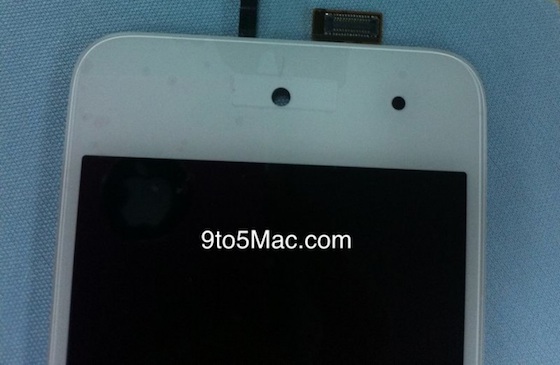
Lending credence to the claims of a forthcoming white iPod touch is the discovery of anew white front plate for the iPod touch obtained by parts and repair firm iFixyouri and reported to 9 to 5 Mac. The white part appears essentially identical to the black one used in the current iPod touch, and thus it can not be definitively stated whether the part is intended for a forthcoming model or was for a white version of the current generation that was ultimately scrapped before release.


Source: macrumors via 9to5

Harry Potter partners with Google, snubs Apple and PayPal


Google has joined forces with the most famous wizard in the world, Harry Potter, which could mean a big boost for two of its services while also resulting in a huge missed opportunity for Apple and PayPal. The partnership with the new Pottermore website by Harry Potter author JK Rowling will make the e-book version of the seven Harry Potter books available on Google's eBooks reader. The deal also makes Google's payment service Google Checkout the official third-party form of payment for Pottermore. By partnering with Google eBooks, Rowling has found a way to put her seven highly-in-demand books on smartphones, tablets, e-readers and computers without having to split the sales with companies such as Apple or Amazon, who typically keep about 30% of sales. Rowling's distribution method gives publisher's more leverage when it comes to selling e-books, said Craig Vodnik, chief blogger for BuildingKeystones.com, a blog about digital product e-commerce.


"It could be a really, really big deal if this works out based off the titles she's written and she's just so well-known," he said. "From the publisher's perspective it's a big deal because it could give them some control over how they distribute their products." Vodnik said Google landing Rowling is similar to when Apple finally got the Beatles on their iTunes catalog. In what must have been the tradeoff in the deal, Google's payment service Google Checkout appears to be the only way besides debit or credit cards to purchases the books from Pottermore. The inclusion of Google Checkout is a huge snub for PayPal, the original and most used third-party payment service online.

Instead, Google Checkout will be exposed to millions of Harry Potter fans looking to buy digital versions of the wizard stories. In the last few months, Google has been strengthening its push into the e-commerce and mobile payment fields, announcing recently it had begun testing a service called Google Wallet, which allows consumers to pay using their Android phones using a technology called NFC. The Harry Potter books could become the most purchased e-books upon their release if the franchise's performance at the box office and at book stores are any indication. The final Harry Potter film had the best opening of all time, scoring $168.6 million in the U.S. and Canada in three days. Four years ago, the last Harry Potter book had a similar release, selling 8.3 million copies in its first day, according to Guinness World Records.

Apple Releases New Sandy Bridge Mac Minis and Thunderbolt Display


Apple today released an update to its Mac mini line, bringing Intel's Sandy Bridge platform to the diminutive desktop computer along with new support for the Thunderbolt connectivity standard being pushed by Apple and Intel. The new Mac mini lineup consists of two standard stock configurations alongside a "server" model. Notably, all models drop the optical disc in favor of an optional external SuperDrive. 

Standard models 
- 2.3 GHz Intel Core i5, 500 GB hard drive, 2 GB RAM: $599 
- 2.5 GHz Intel Core i5, 500 GB hard drive, 4 GB RAM: $799 

Server model 
- 2.0 GHz, dual 500 GB hard drives, 4 GB RAM: $999 

Additional build-to-order options include an upgrade to 8 GB of RAM, up to 750 GB hard drives, and an external SuperDrive. The high-end standard model and the server model can also be configured with one (standard) or two (server) 256 GB solid-state drives.

The new Mac mini delivers up to twice the processor and graphics performance of the previous generation in the same amazingly compact and efficient aluminum design.* Starting at just $599 (US), the new Mac mini is available for order today and in stores tomorrow.

“Mac mini delivers the speed and expandability that makes it perfect for the desktop, living room or office,” said Philip Schiller, Apple’s senior vice president of Worldwide Product Marketing. “With faster processors, more powerful graphics and Thunderbolt in an incredibly compact, aluminum design, the new Mac mini is more versatile than ever.”
All Mac mini models ship with OS X Lion pre-installed. 


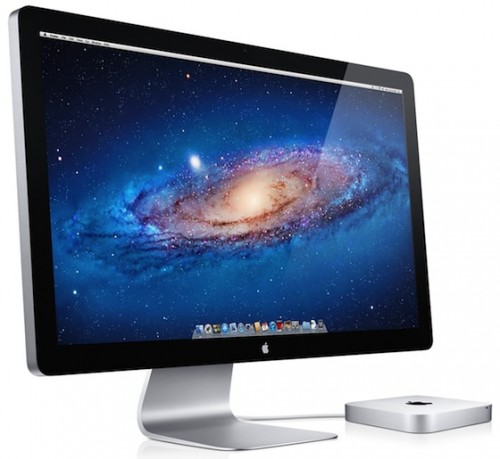
Alongside the new Mac mini models, Apple also announced a new Apple Thunderbolt Display. Appearing nearly identical to the previous 27-inch LED Cinema Display, the primary upgrade to Apple's sole standalone display offering is Thunderbolt compatibility, enabling the device to be used within daisy-chained configurations of the new high-speed data and display connectivity standard. With the new standard, users can for the first time run two displays off of a single Thunderbolt port on Macs offering enough graphics horsepower to support the pixel load. 


The upgrade to Thunderbolt also allows Apple to turn the display into an "ultimate docking station", with the new display now offering a built-in FaceTime HD camera, 2.1 speaker system, three USB ports, one Firewire 800 port, one Gigabit Ethernet port, and a second Thunderbolt port to enable daisy chaining. An integrated MagSafe cable for powering connected notebook computers also continues to be offered.


“The Apple Thunderbolt Display is the ultimate docking station for your Mac notebook,” said Philip Schiller, Apple’s senior vice president of Worldwide Product Marketing.” With just one cable, users can dock with their new display and connect to high performance peripherals, network connections and audio devices.”

Images of the new Thunderbolt-enabled LED Cinema Display leaked on Apple's site late last week, foreshadowing their arrival alongside the Mac minis that do not ship with an included display. The new LED Cinema Display will be available within the next 60 days and is priced at $999.


Source: Macrumors via apple